

Documentation Index
Fetch the complete documentation index at: https://cometchat-22654f5b-react-uikit-v7.mintlify.app/llms.txt
Use this file to discover all available pages before exploring further.
AI Integration Quick Reference
AI Integration Quick Reference
Overview
CometChatThreadHeader displays the parent message bubble and reply count for threaded conversations. It renders a top bar with the thread title, sender name, and close button, followed by the parent message bubble and a real-time reply count divider. Wire it above a CometChatMessageList (with parentMessageId) and CometChatMessageComposer to build a complete thread view.
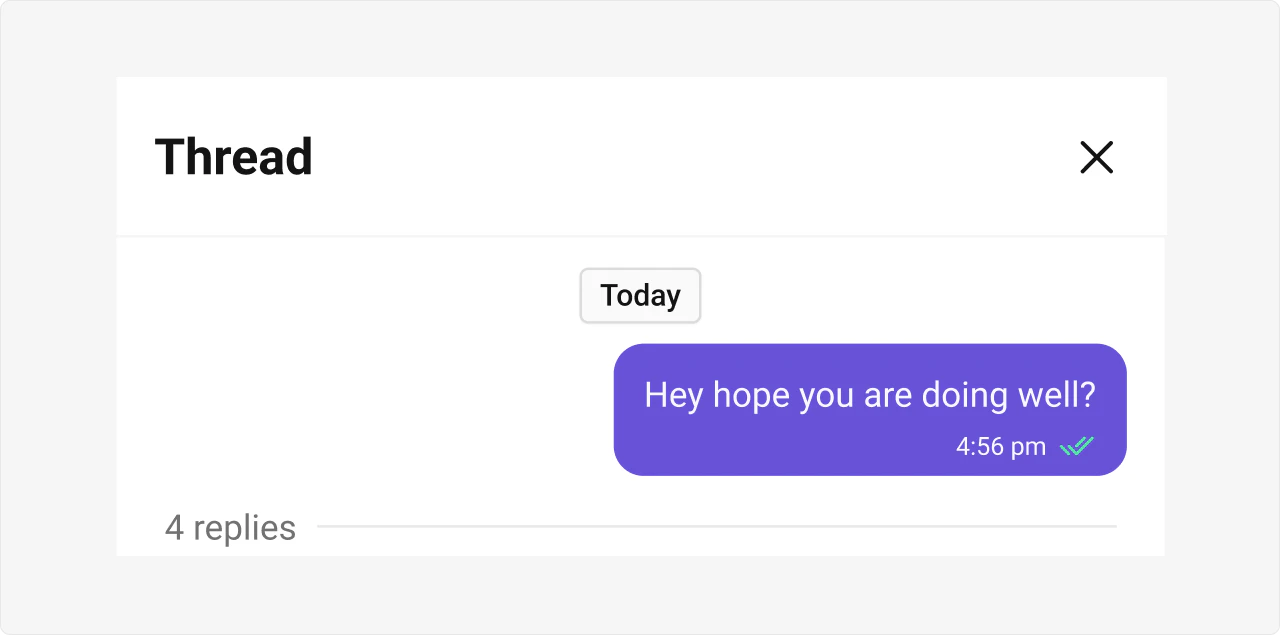
Live Preview — interact with the default thread header.Open in Storybook ↗
The component handles:
- Rendering the parent message as a bubble
- Real-time reply count updates via SDK listeners
- Parent message edit/delete detection
- Close button and keyboard (Escape) dismissal
Usage
Flat API
Compound Composition
Full Layout Example
Filtering
This component does not support request builders or filtering. It renders a single parent message and its reply count.Actions and Events
Callback Props
| Prop | Signature | Fires when |
|---|---|---|
onClose | () => void | Close button clicked or Escape pressed |
onSubtitleClicked | () => void | Sender name / subtitle is clicked |
onParentDeleted | () => void | Parent message is deleted (thread should close) |
onError | ((error: CometChat.CometChatException) => void) | null | SDK error occurs |
Events Emitted
This component does not emit UI events.Events Received
UI events this component subscribes to (published by other components):| Event | Payload | Behavior |
|---|---|---|
ui:message/sent | { message, status: 'success' } | Increments reply count when current user sends a reply in this thread |
ui:compose/edit | { message, status: 'success' } | Updates the parent bubble when the parent message is edited |
ui:message/deleted | { message } | Triggers onParentDeleted when the parent message is deleted |
SDK Listeners (Automatic)
These SDK listeners are attached internally. The component updates its state automatically — no manual subscription needed:- Message listeners:
onTextMessageReceived,onMediaMessageReceived,onCustomMessageReceived,onInteractiveMessageReceived— increments reply count when other users send replies - Edits:
onMessageEdited— updates parent bubble when edited by another user - Deletes:
onMessageDeleted— triggersonParentDeletedwhen deleted by another user
Customization
View Props
Use view props to replace sections of the default UI while keeping the component’s behavior intact:| Slot | Type | Replaces |
|---|---|---|
headerView | ReactNode | Entire top bar (title + sender + close button) |
messageBubbleView | ReactNode | Parent message bubble |
subtitleView | ReactNode | Subtitle below the title |
Compound Composition
For full layout control, use sub-components. Omit any sub-component to hide it:| Sub-component | Description | Props | Flat API equivalent |
|---|---|---|---|
Root | Context provider and container | All Root props + children | — |
TopBar | Top bar container | children, className | headerView |
Title | Thread title text | title, className | — |
SenderName | Parent message sender | className | — |
CloseButton | Close button | className | — |
ParentBubble | Parent message bubble | disableInteraction, messageSentAtDateTimeFormat, className | messageBubbleView |
ReplyCount | Reply count with divider | showDivider, className | — |
CSS Styling
Override design tokens on the component selector:Props
parentMessage is required. All other props are optional.
View slot props (
headerView, messageBubbleView, subtitleView) are convenience props available only on the flat API. In compound composition mode, use the corresponding sub-components directly.parentMessage
The parent message of the thread. Required.| Type | CometChat.BaseMessage |
| Required | Yes |
hideReceipts
Hide message delivery/read receipts on the parent bubble.| Type | boolean |
| Default | false |
hideDate
Hide the date chip shown above the parent bubble.| Type | boolean |
| Default | false |
hideReplyCount
Hide the reply count section below the parent bubble.| Type | boolean |
| Default | false |
separatorDateTimeFormat
Custom date/time format for the date chip shown above the parent bubble.| Type | CometChatDateFormatConfig |
| Default | undefined |
messageSentAtDateTimeFormat
Custom date/time format for the sent-at timestamp on the parent message bubble.| Type | CometChatDateFormatConfig |
| Default | undefined |
showScrollbar
Show the native scrollbar on the bubble wrapper area.| Type | boolean |
| Default | false |
onClose
Callback when the close button is clicked or Escape is pressed.| Type | () => void |
| Default | undefined |
onSubtitleClicked
Callback when the sender name / subtitle is clicked (navigate to parent in main list).| Type | () => void |
| Default | undefined |
onParentDeleted
Callback when the parent message is deleted (thread should close).| Type | () => void |
| Default | undefined |
onError
Callback when an SDK error occurs.| Type | ((error: CometChat.CometChatException) => void) | null |
| Default | null |
headerView
Custom content to replace the entire top bar (title + sender name + close button).| Type | ReactNode |
| Default | undefined |
messageBubbleView
Custom content to replace the parent message bubble rendering.| Type | ReactNode |
| Default | undefined |
subtitleView
Custom subtitle view below the title.| Type | ReactNode |
| Default | undefined |
CSS Selectors
| Target | Selector |
|---|---|
| Root container | .cometchat-thread-header |
| Top bar | .cometchat-thread-header__top-bar |
| Content area | .cometchat-thread-header__content |
| Title | .cometchat-thread-header__title |
| Sender name | .cometchat-thread-header__sender-name |
| Close button | .cometchat-thread-header__close-button-wrapper |
| Bubble wrapper | .cometchat-thread-header__bubble-wrapper |
| Body timestamp | .cometchat-thread-header__body-timestamp |
| Reply count | .cometchat-thread-header__reply-count |
| Reply count divider | .cometchat-thread-header__reply-count-divider |
Next Steps
Message List
Display threaded replies below the parent message
Message Composer
Compose replies in the thread
Theming
Customize colors, fonts, and spacing