

Documentation Index
Fetch the complete documentation index at: https://cometchat-22654f5b-react-uikit-v7.mintlify.app/llms.txt
Use this file to discover all available pages before exploring further.
AI Integration Quick Reference
AI Integration Quick Reference
Overview
CometChatUsers is a list component that renders all available users in the app. It emits the selected CometChat.User via onItemClick. Wire it to CometChatMessages or use it as a user picker in flows like “new conversation” or “add members to group.”
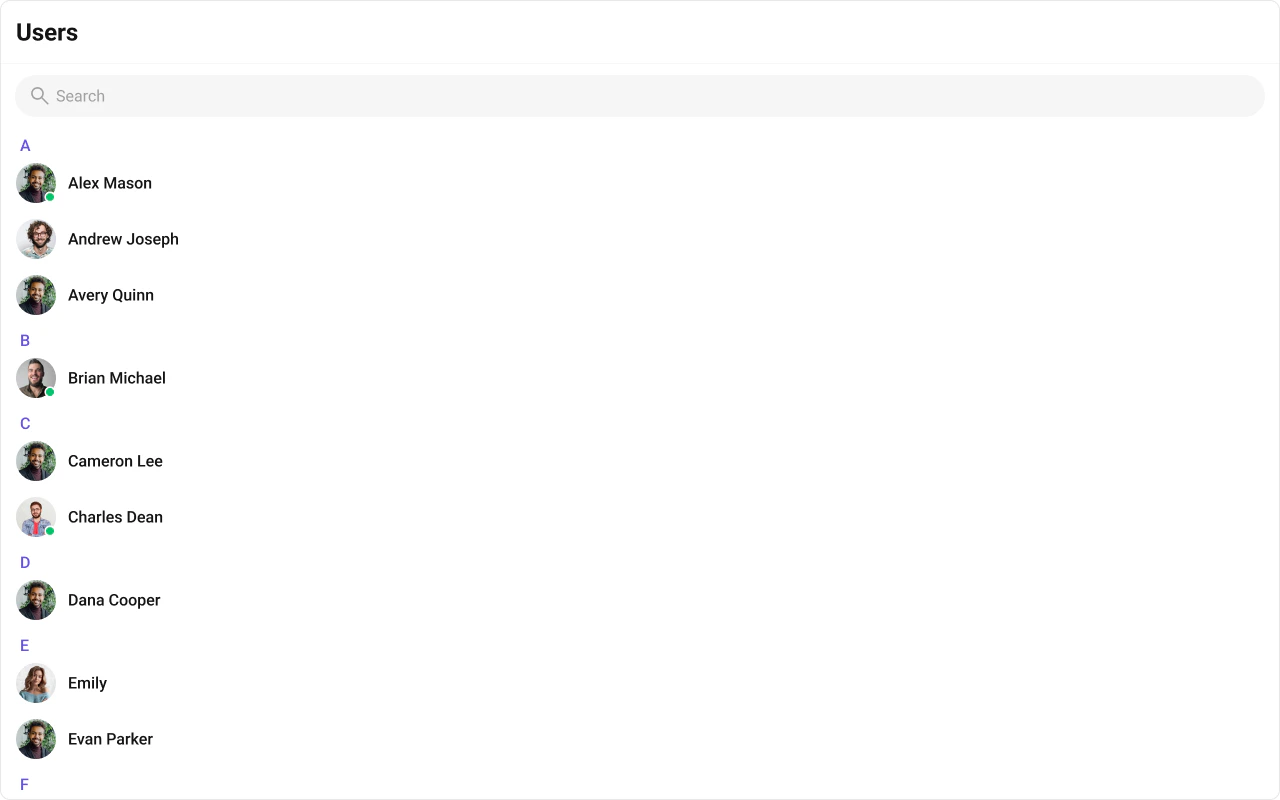
Live Preview — interact with the default users list.Open in Storybook ↗
The component handles:
- Paginated fetching with infinite scroll
- Real-time presence updates (online/offline)
- Search filtering
- Alphabetical section headers
- Selection mode (single/multiple) with optional preview chips
Usage
Flat API
Compound Composition
New Conversation Example
Filtering
Pass aCometChat.UsersRequestBuilder to usersRequestBuilder to control which users load. Pass the builder instance — not the result of .build().
Search
The component includes a built-in search bar. When the user types, it fetches matching users from the server. For custom search behavior, pass asearchRequestBuilder:
Filter Recipes
| Recipe | Code |
|---|---|
| Only online users | new CometChat.UsersRequestBuilder().setStatus("online") |
| Only friends | new CometChat.UsersRequestBuilder().friendsOnly(true) |
| Limit page size | new CometChat.UsersRequestBuilder().setLimit(10) |
| By role | new CometChat.UsersRequestBuilder().setRoles(["admin"]) |
| With tags | new CometChat.UsersRequestBuilder().setTags(["vip"]) |
| Hide blocked | new CometChat.UsersRequestBuilder().hideBlockedUsers(true) |
Actions and Events
Callback Props
| Prop | Signature | Fires when |
|---|---|---|
onItemClick | (user: CometChat.User) => void | User clicks a user item |
onSelect | (user: CometChat.User, selected: boolean) => void | User selected/deselected (selection mode) |
onError | ((error: CometChat.CometChatException) => void) | null | SDK error occurs |
onEmpty | () => void | List is empty after initial fetch |
Events Emitted
This component does not emit any UI events.Events Received
UI events this component subscribes to (published by other components):| Event | Payload | Behavior |
|---|---|---|
ui:user/blocked | { user } | Updates user in the list (shows blocked state) |
ui:user/unblocked | { user } | Updates user in the list (removes blocked state) |
SDK Listeners (Automatic)
These SDK listeners are attached internally. The component updates its state automatically — no manual subscription needed:- Presence:
onUserOnline,onUserOffline
Customization
View Props
Use view props to replace sections of the default UI while keeping the component’s behavior intact:| Slot | Signature | Replaces |
|---|---|---|
itemView | (user) => ReactNode | Entire user row |
leadingView | (user) => ReactNode | Avatar section |
titleView | (user) => ReactNode | User name |
subtitleView | (user) => ReactNode | Status text |
trailingView | (user) => ReactNode | Trailing content |
headerView | ReactNode | Header area |
loadingView | ReactNode | Loading shimmer |
emptyView | ReactNode | Empty state |
errorView | ReactNode | Error state |
Compound Composition
For full layout control, use sub-components. Omit any sub-component to hide it:| Sub-component | Description | Props | Flat API equivalent |
|---|---|---|---|
Root | Context provider and container | All Root props + children | — |
List | Scrollable user list | itemView, className | itemView |
Item | Individual user row | leadingView, titleView, subtitleView, trailingView, className | Per-item view props |
Header | Header area | title, children | headerView |
SearchBar | Search input | placeholder | — |
SectionHeader | Alphabetical section header | letter | — |
EmptyState | Empty state | children | emptyView |
ErrorState | Error state | children | errorView |
LoadingState | Loading shimmer | children | loadingView |
SelectedPreview | Selected users chip bar | chipView | — |
CSS Styling
Override design tokens on the component selector:Props
All props are optional.View slot props (
headerView, searchView, loadingView, emptyView, errorView, itemView, leadingView, titleView, subtitleView, trailingView) are convenience props available only on the flat API. In compound composition mode, use the corresponding sub-components directly.usersRequestBuilder
Custom request builder for fetching users. Controls pagination, filtering, and sorting.| Type | CometChat.UsersRequestBuilder |
| Default | SDK default (limit 30) |
searchRequestBuilder
Custom request builder used specifically when the user searches. Separate from the main builder.| Type | CometChat.UsersRequestBuilder |
| Default | undefined |
searchKeyword
Initial search keyword to pre-filter users on mount.| Type | string |
| Default | undefined |
hideUserStatus
Hide the online/offline status indicator on user avatars.| Type | boolean |
| Default | false |
hideSearch
Hide the search bar entirely.| Type | boolean |
| Default | false |
showSectionHeader
Show alphabetical section headers (A, B, C…) in the user list.| Type | boolean |
| Default | true |
showSelectedUsersPreview
Show a preview strip of selected user chips above the list (useful in multi-select mode).| Type | boolean |
| Default | false |
showScrollbar
Show the native scrollbar on the user list.| Type | boolean |
| Default | false |
selectionMode
Enable selection mode for single or multi-select operations.| Type | 'none' | 'single' | 'multiple' |
| Default | 'none' |
activeUser
The currently active/highlighted user. The matching item receives an active visual state.| Type | CometChat.User |
| Default | undefined |
sectionHeaderKey
The property ofCometChat.User used to group users into sections (e.g., first letter of name).
| Type | keyof CometChat.User |
| Default | undefined |
options
Function that returns context menu options for each user item (shown on hover/swipe).| Type | (user: CometChat.User) => CometChatUserOption[] |
| Default | undefined |
onItemClick
Callback when a user item is clicked.| Type | (user: CometChat.User) => void |
| Default | undefined |
onSelect
Callback when a user is selected or deselected (only fires in selection mode).| Type | (user: CometChat.User, selected: boolean) => void |
| Default | undefined |
onError
Callback when an SDK error occurs during fetch or real-time operations.| Type | ((error: CometChat.CometChatException) => void) | null |
| Default | null |
onEmpty
Callback when the user list is empty after the initial fetch completes.| Type | () => void |
| Default | undefined |
CSS Selectors
| Target | Selector |
|---|---|
| Root container | .cometchat-users |
| Header | .cometchat-users__header |
| Search bar | .cometchat-users__search-bar |
| List container | .cometchat-users__list |
| User item | .cometchat-users__item |
| Active item | .cometchat-users__item--active |
| Section header | .cometchat-users__section-header |
| Empty state | .cometchat-users__empty-state |
| Error state | .cometchat-users__error-state |
| Loading state | .cometchat-users__loading-state |
Next Steps
Conversations
View recent conversations for the logged-in user
Groups
Browse and join groups
Message List
Display messages for the selected user
Theming
Customize colors, fonts, and spacing